
March 1, 2026
Warehouse menu updates
- 'Packing' is now 'Fulfillment'
- 'Repacks' is now 'Pack-Outs & Repacks'
Nov 11, 2025
Silo Inventory Management System
Access lot details from repacks workflow
- You can now access the lot details of any input and output lot from the repacks screen
Silo Accounting and payments
Total Due
- When recording payments to vendors or from customers, you will now see the total due for that particular customer or vendor.
Aug 27 - Sep 9
Silo Inventory Management System
Print Pallet Labels for Transfers
- You can now easily print pallet labels for all output lots on a transfer from the transfer details panel. We’ve also refreshed the UI of the panel and the Transfers screen for better consistency with the rest of Silo.
Customer Attachments
- You can now attach documents to customers, specify expiration dates for them, and see warnings when creating sales orders for customers with expired attachments.
Silo Accounting and Payments
Cards Fees on Payment Receipts
- If your customer incurs a card fee making a payment through payment portal, it will now be reflected on the receipt you can print from the AR Payments screen. The payment amount shown on the screen will not be affected.
Aug 13 - Aug 26
Silo Inventory Management System
View Blended Margin for Existing SOs
- You can now see the estimated blended margin when viewing or editing an existing SO. This is calculated the same way as when creating a new SO and does not include non-inventory items, SO expenses, or associated credits.
Silo Accounting
Customer Payment Portal Redesign
- Your customers will see a new & improved UI when sending you payments via Silo’s payment portal.
Jul 30 - Aug 12
Silo Inventory Management System
Flag sales orders
- You can now flag sales orders like you can POs. A flag icon will appear anywhere in Silo that the SO # or invoice # displays, and a warning will appear if a user tries to record payment for a flagged SO.
SO UI updates
- We’ve made some minor updates to the appearance of SOs, especially the lot assignment drawer and the credit creation panel.
Jul 16 - Jul 29
Silo Inventory Management System
Populate sales orders with AI
- You can now paste order text from your customers into Silo to have AI automatically find the right items in your inventory and pre-populate them on a sales order. Learn more:
 How to Add Items to Sales Orders with AI
Silo Accounting
Close and lock your books
- You can now specify a financial period close date in Settings > Accounting. Any transactions on or before the close date will only be editable by users with “Edit Locked Financial Data” permission. Learn more: Closing and Locking a Financial Period
Jul 2 - Jul 15
Silo Inventory Management System
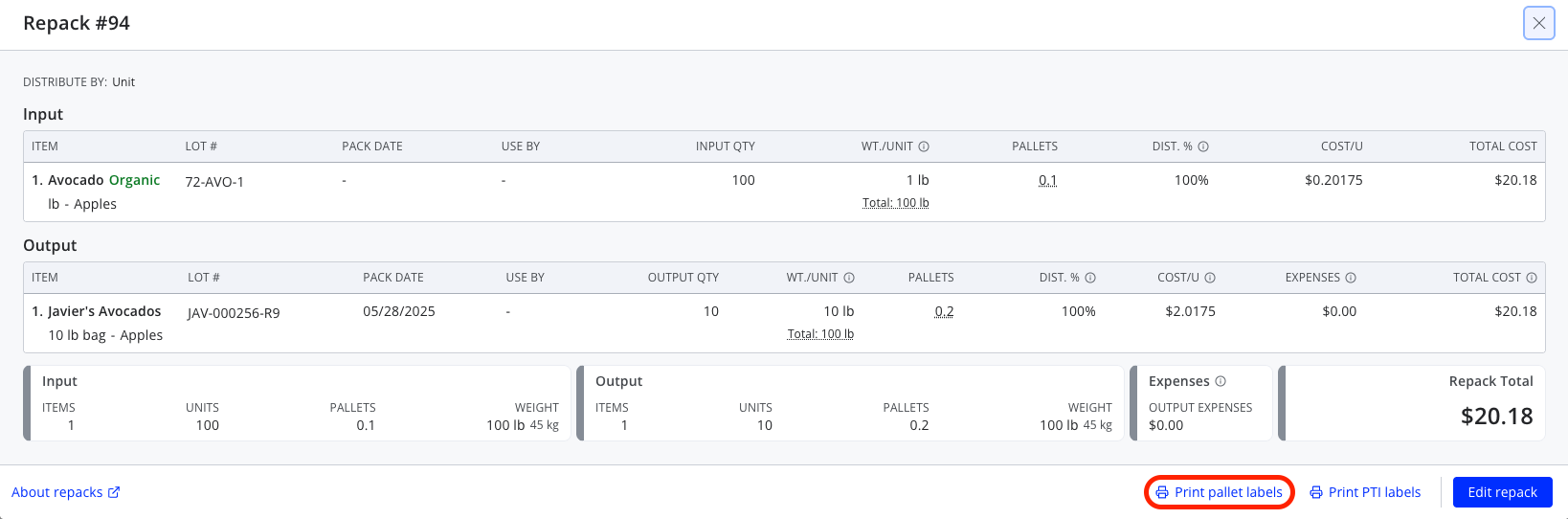
Print Pallet Labels for Repack
- You can now easily print pallet labels for all output lots on a repack from the view repack window.
Jun 18 - Jul 1
Silo Inventory Management System
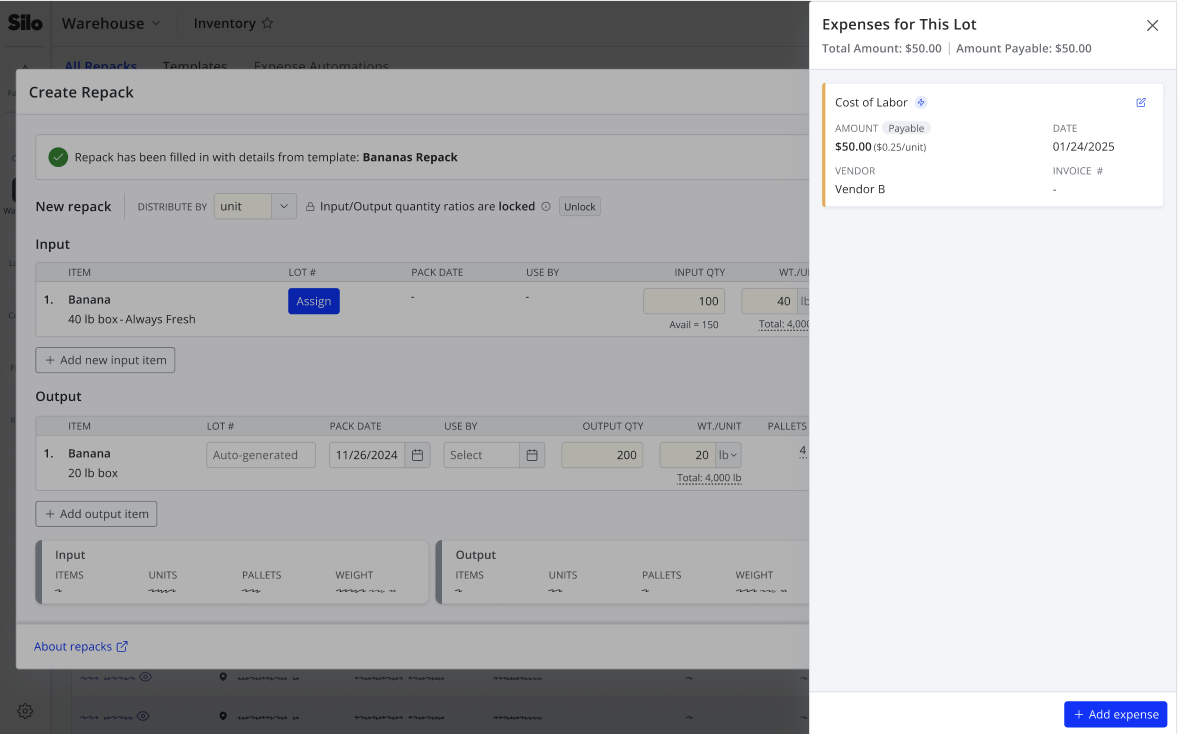
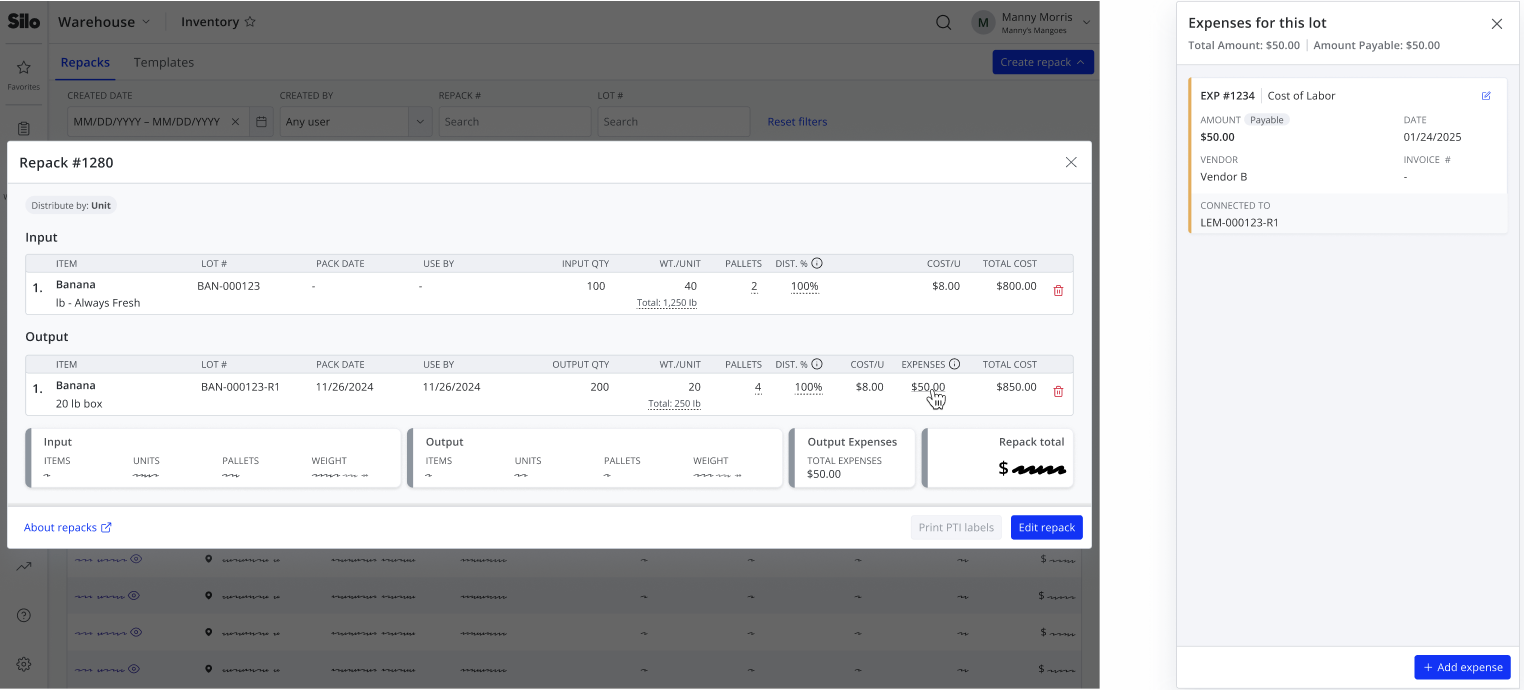
Auto-Generate Repack Output Expenses
- You can now use expense automations to automatically generate expenses on output lots while creating a repack.
May 21 - June 17
Silo Accounting & Payments
Reconciliation Status in Ledgers
- When viewing a specific account or general detail ledger, you can now see whether each relevant journal entry has been reconciled with a link to the related reconciliation entry.
May 7 - May 20
Silo Inventory Management System
Avoid Duplicate Orders
- You’ll now receive a warning if you attempt to create a PO with the same vendor invoice number as another PO from the same vendor in the last 180 days. This warning can be turned off with a new setting in Settings > Orders > Purchase Orders.
Find Disabled Customers More Easily
- It’s now easier to see which customers are disabled on the Customers screen and in the Record Payment window.
Silo Accounting & Payments
View Balance in Chart of Accounts
- We’ve added a Current Balance column to the Chart of Accounts screen so you can easily review all of your account balances in one place.
April 23 - May 6
Silo Inventory Management System
Edit Expenses on Repack Output Lots
- You can now edit expenses on repack output lots during repack creation and when viewing an existing repack.
Create Repack Recipes
- You can now create repack templates with linked item quantities, so that editing one quantity on a repack created from the template automatically updates all other input and output quantities.
April 9 - April 22
Silo Inventory Management System
Better Enforcement of Credit Limits and Overdue Balances
- If you’ve turned on the settings to block sales orders to customers who are overdue or over their credit limit, Silo will now enforce these restrictions when editing existing orders and making changes that will cause a customer to become overdue or go over their limit.
March 26 - April 8
Silo Inventory Management System
Updated Expense UI
- We’ve updated the expense card UI when viewing expenses connected to a purchase order or sales order to show more information with less wasted space.
Silo Accounting & Payments
Include Future Invoices in Customer Balance
- Future invoices will now be included in the total customer balance shown in Debt Aging and Unpaid Sales Aging and will be taken into account when determining whether the customer is over their credit limit.
Manage Your Vendors’ Bank Information
- You can now enter your vendors’ bank information in the Vendors screen to start sending them ACH payments immediately, rather than waiting for them to enroll.
March 12 - March 25
Silo Inventory Management System
Repack Templated
- You can now use templates to speed up repack creation
February 26 - March 11
Silo Inventory Management System
Export Price Sheets
- You can now export your price sheets to .csv files
Silo Accounting & Payments
Bulk Approve & Reject Payments
- You can now bulk approve or reject BillPay payments to your vendors and leave a note when rejecting payments.
February 12 - February 25
Silo Inventory Management System
Email BOLs and Pick Tickets
- You can now email BOLs and pick tickets when creating or viewing an SO, as well as configure which customer contacts should receive them by default.
View Creation Dates in the Audit Log
- You can now see and filter on the creation date of POs, SOs, payments, and any other resources shown in the Audit Log.
New Inventory by Day Report
- Silo now offers a new report to review projected inventory counts for the next 7 days.
January 29 - February 11
Silo Inventory Management System
Standalone Audit Log
- The Audit Log has moved from Settings to the Reports section, and there is now a permission to control which users can access it.
Editable Sales Rep During SO Creation
- You can now edit the sales rep while creating a new sales order.
Silo Accounting & Payments
Expense Attachments
- You can now attach files to expenses like you can with SOs and POs.
January 15- January 28
Silo Inventory Management System
See What’s New
- You can now use the “What’s New” link under the “?” button on the navigation bar to easily see what features Silo has recently released.
Restrict SO Access
- You can now use permissions to restrict users’ access to only SOs on which they are the sales rep.
Paste Numbers with Commas
- You can now paste numbers with comma separators in any numeric field in Silo.
Auto-Fill Vendor When Generating POs for Oversold
- You can now easily select a vendor for all items when generating POs in the Oversold screen.
December 18 2024 - January 14 2025
Silo Accounting & Payments
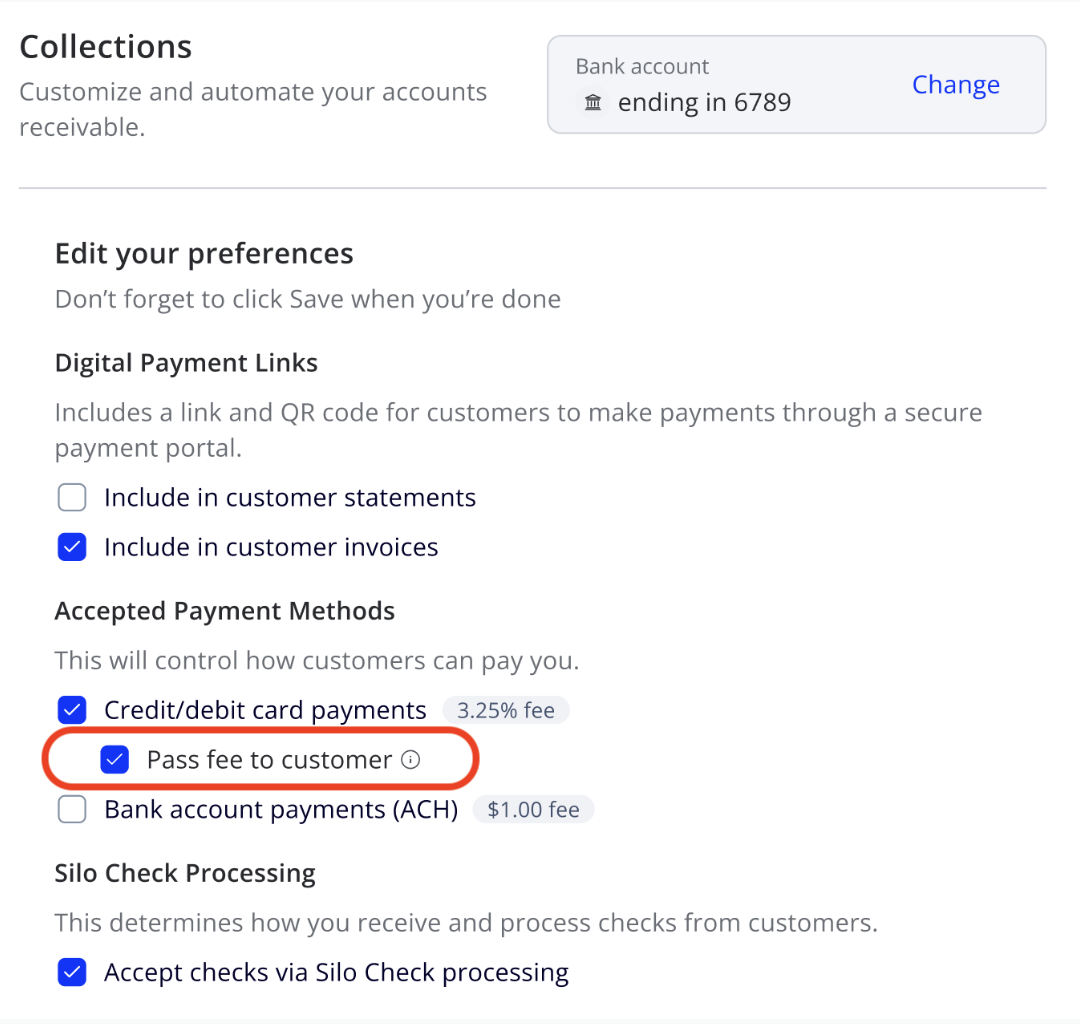
Card Fee Passthrough
- If you accept digital payments via credit or debit card, you can now pass on the 3.25% card fee to your customers.
December 4- December 17
Silo Inventory Management System
Customize price sheet contact info
- On the Customers screen, you can now select which user’s contact information should display on emailed price sheets for each customer.
Access multiple companies with the same email
- You can now access multiple companies on Silo using the same email address.
Auto-split POs into pallet increments
- When creating a PO, you can now easily split each item into pallet increments with the ‘Split into pallets’ button.
Buying intelligence
- When adding items to a PO, you can now easily view information about expected incoming and outgoing units and item price history, similar to the Pricing Intelligence panel for SOs. Just click the icon between quantity and cost.
Permission to unfulfill SOs
- To give you more granular control, there are now separate permissions for fulfilling and unfulfilling SOs instead of a single permission for both.
Silo Inventory Management System
OMS-specific permissions
- For users of IMS with OMS, we now offer OMS-specific permissions to give you more granular control of which users can access online ordering functionality.
November 19 - December 3
Silo Accounting & Payments
Settlement Email Notifications
- When you receive a new settlement from Silo Collects, you will now receive an automated email notification with an attached pdf of the settlement details. You can configure which users receive this email in Settings > Accounting.
Silo Order Management System
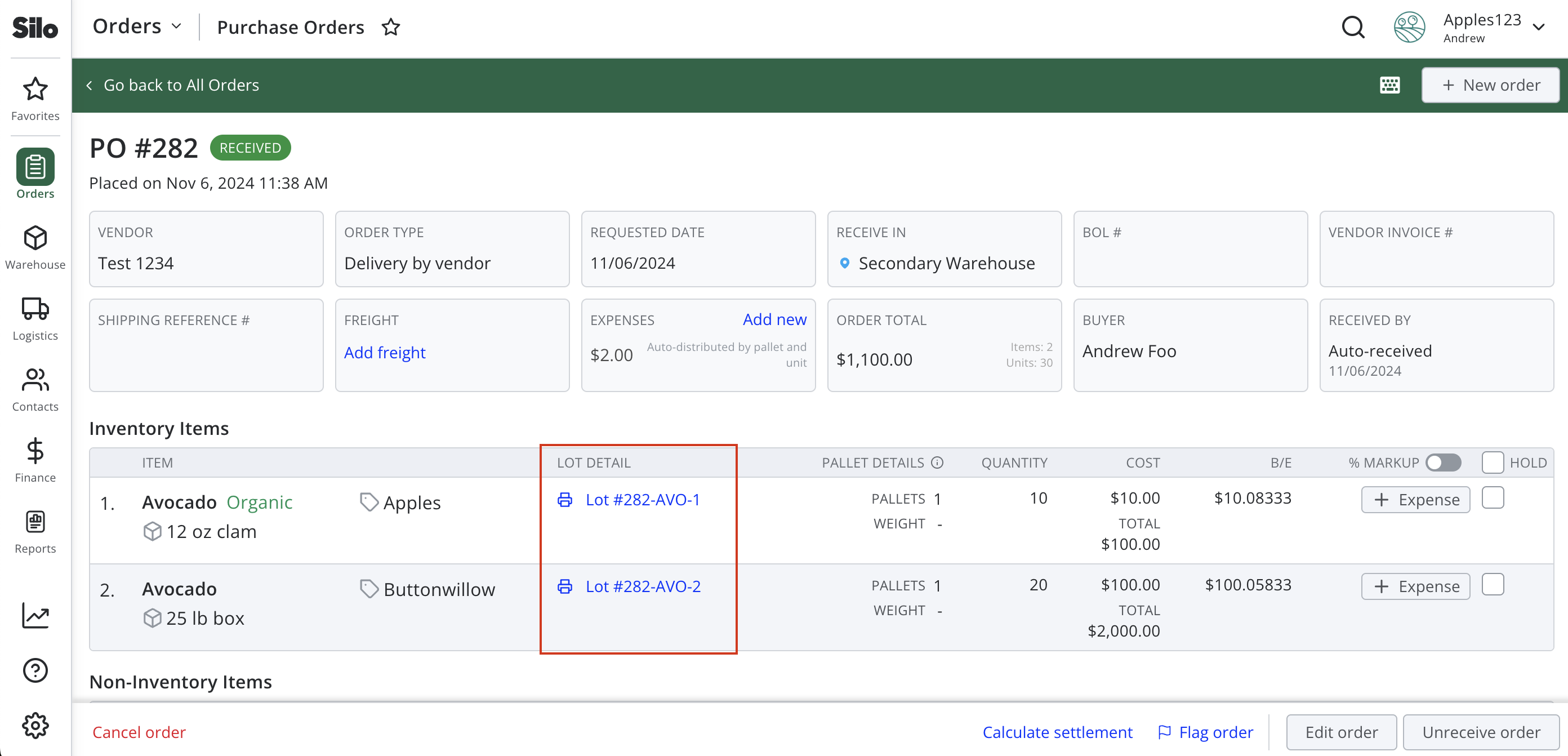
Access Lot Details from POs
- There is now a link to allow easy access to lot details for each item on a PO.
November 6 - November 18
Silo Inventory Management System
Search by Invoice # on Oversold Screen
- You can now search by invoice number on the Oversold screen, allowing you to easily create a PO to fulfill a specific sales order.
October 23 - November 5
Silo Inventory Management System
Export the Audit Log
- You can now export your audit log entries to a .csv file for more advanced filtering.
Silo Accounting & Payments
More Helpful Notes for Automated Journal Entries
- The Notes column in Ledgers will now display the notes associated with the resource that created the automated journal entry. For example, notes to vendor will display for PO journal entries and internal notes will display for SO journal entries.
October 9 - October 22
Silo Order Management System
Flag POs
-
You can now flag POs to indicate issues with the product received. Flags will appear across the Silo platform, and users will see a warning when attempting to pay a flagged PO.
Customize SO Email Recipients
- You can now specify separate customer contacts to receive invoice and sales confirmation emails. You can also choose which contacts you want to email a particular SO without overriding your defaults.
Silo Accounting & Payments
Settlement Report
- Users of Silo Collects have access to a new Settlements screen in Reports > Financial, which shows the details of all payments included in each settlement deposited in your bank account. See this article for more information.
Updated General Summary Ledger
- On the General Summary Ledger, liability, revenue, and equity accounts will now be treated as debit normal to make it easier to reconcile your starting and ending balances.
September 11 - September 24
Silo Payments
More Editable Fields on Payments
- You can now editable the date, notes, payment method, and check number on existing manually recorded AP and AR payments.
August 14 - August 27
Inventory Management
Print PTI Labels for Repacks
- You can now easily print PTI labels for all output lots on a repack from the Repack window.
New Options for Pallet Labels
- There are now new settings to control which quantities and dates display on pallet labels. These are available in Settings > Orders if you have the Pallet Definitions feature is turned on.
July 31 - August 13
Inventory Management
Updates to Purchased Lots Report
- The Purchased Lots report now includes the ability to filter by vendor and the export includes more information about the PO on which the lot was purchased.
Order Management
Link to Your Online Ordering Catalog
- Online ordering vendors can now easily copy a direct link to their catalog from the Online Orders > Incoming Requests screen to share with customers via text or WhatsApp.
July 17 - July 30
Inventory Management
Availability Date Range on Price Sheets
- You can now display the date range of items available on printed and emailed price sheets.
Scan to Lot SOs
- You can now scan pallet labels to lot sales orders. Read this article to learn more, and then contact your CSM to get started.
July 3 - July 16
Inventory Management
Organic PTI Labels
- When printing labels for an organic item, PTI labels will now show “(Organic)” before the product name.
Freight
Book Multi-Stop Loads
- You can now book multi-stop FTL loads through Silo. Each additional stop adds $150 to the base rate for your load.
June 19 - July 2
Inventory Management
Price Sheet Redesign
- You can now define display groups for items in the Inventory > Details screen to group items on printed price sheets.
Accounting & Payments
Record Unapplied Vendor Payments
- You can now record payments to vendors without applying them to POs or expenses and apply them later from the Pay Vendor > Apply Credits window.
Order Management
Share Prices via Online Orders
- Vendors using both IMS and OMS can now choose to share price sheet prices with their OMS customers. These prices will default in when the customer adds items from your catalog and cannot be edited by the customer.
June 5 - 18
Freight
Update Load Statuses
- Freight users can now update the status of loads they are the provider for within Silo.
Chat About Freight Loads
- When viewing a load in Silo, you can now initiate a chat between the customer of the load, the freight provider, and Silo, making it easier to get your questions about a load answered quickly.
Order Management
See Available to Sell Quantity in Online Orders
- Vendors using Online Orders with IMS can now see the available to sell quantity for each inventory item inline when viewing an order request so that you can easily see if you need to substitute a different item.
Print Online Order Requests
- Customers and vendors using Online Orders can now print their order requests.
Accounting & Payments
New Invoice and Expense Filters
- You can now filter by customer code on the Sales > Invoices screen and by vendor code on the Expenses > Expenses screen.
Sales:
Expenses:
May 24 - June 4
Inventory Management
Bulk-Publish Price Sheet Items
- You can now multi-select items on the Inventory > Pricing screen to easily publish or unpublish multiple items from a price sheet at the same time.
Freight
Customer & Provider Load Views
- We now have separate views in the Loads screen for loads you’ve booked with Silo and loads for which you’re the freight provider.
May 8 - May 21
Inventory Management
Create Inventory Items Without Labels
- Silo now supports creating new inventory items without specifying a label.
New Filter for Signed-Off Sales Invoices
- A new filter has been added to the Sales > Invoices screen. It looks for sales invoices marked as “signed off.”
Silo Pay
Improved BillPay Check Status Tracking
- You can now implement better visibility of when a check has been successfully deposited by a vendor. To get started, add a signature to your BillPay settings.
Freight
Updated Freight Screens
- We’ve given the Freight screens clearer names. You can book FTL using the “Book FTL Freight” option (previously “Book Freight”), and you can book LTL using the “Book LTL Freight” option (previously “Shared Trucks”).
View Assigned Freight Provider
- You can now see the freight provider assigned to each of your loads from the Loads and Load Details screens.
Order Management
Link Between OMS Request and Corresponding SO
- If you are using IMS, you can now easily toggle from an online order request and its corresponding sales order.
April 24 - May 7
Core
New Trial Balance Reported for Accounting
- A Trial Balance report has been added for those using the Accounting features.
New Navigation
- Over the next few months, we will be rolling out a new look for Silo. This change with come with many great new benefits including more efficient navigation, the ability to search for specific pages, bookmarking of favorite pages, and more!
Freight
Public Loads List
- You can now lower your per pallet costs by adding your product to trucks that have already been booked by trusted Silo users and freight partners or sharing your booked freight trucks with others.
Book LTL Freight
- You can now book per-pallet rates directly in Silo.
Order Management
Addition of Hotkeys for OMS
- OMS now has hotkeys to help optimize your use of OMS in Silo.
Create SOs from Order Requests
- If you are using both OMS and Core, you can now easily create a sales order populated with the information from a confirmed OMS order request.
April 10 - April 23
Core
Market Trends Report Now Available Within Silo
- We’ve updated the ‘USDA’ link that previously appeared in the navigation bar to now show two reports: the existing USDA Terminal Pricing Report, and a new Silo Market Trends report that combines USDA data with Silo’s insights for a few select commodities in the San Francisco and Los Angeles markets.
Unallocated payments now appear within the AR payments page
- You can now see any unallocated payments within the Accounting sales payments page table as well as by clicking the link in the unallocated payments banner.
More Information in the SO Item Search
- You can now configure the SO item search window to show incoming and on-hand quantities, and we’ve added additional filters so that you can include items with incoming or O/H quantity but no available to sell quantity in your search.
Order Management
Create SOs from Order Requests
- If you are using both OMS and Core, you can now easily create a sales order populated with the information from a confirmed OMS order request.
March 27 - April 9
Capital
Enhanced Cash Advance Dashboard
- The Cash Advance report has been updated to display received repayments by the dates they were received as well as by repayment week.
Bill Pay Improvements
- We’ve eliminated the need to send an invite to your vendor before they can receive digital payments through Silo. Now, simply add their bank information directly, wait for approval, and start sending payments!
Freight
Share Load Details
- You can now share the details of a load with others who may want to join, including those without a Silo login. See this Zendesk Article for more information.
Order Management
Add Items from Previous Request
- Customers creating a new order request in Silo OMS will now be able to add all the items from the previous request to the selected vendor with a single click.
Group Your Item Catalog
- Vendors using Silo OMS will now be able to specify a display group for each item in their catalogue so that their customers can find the right item more easily when placing an online order request.
Waste Reduction Program
-
Silo’s mission is to make supply chains more sustainable through initiatives like the Food Waste Reduction Program.
- What the program includes:
- An action-oriented analyses of the cost of your waste - ask your Customer Success Manager!
- Ways to mitigate waste customized to your results
- How you can easily donate product through Silo before it becomes waste
- How donating can yield tax incentives
Resources We Offer:
- Zendesk Article: key info on how to donate
- Donation Platform: fill out to submit a donation
- Waste Reduction Recommendations: action you can take to reduce your waste
March 13 - March 26
New
Pickup Date on SOs
- You can now specify the date you expect a sales order to be picked up, in addition to the date your customer has requested to receive it. The pickup date will also be used when auto-generating a freight quote for the order.
Feb 28 - March 12
New
View per-pallet freight rates
- If you need to book freight and have less than a full truckload, you can view available lanes and rates in the new Per-Pallet Lanes screen and reach out to Silo to book.
Feb 14 - Feb 27
New
Lots Screen Summary Bubble Permission
- We’ve added a new permission so you can control which users can see the summary bubbles at the top of the Lots screen.
Silo Vendor
- We’ve created a Silo as a vendor in your system that you can use to track expenses and payments to Silo.
Enhanced
Search by invoice # or customer PO # when recording payments
- When recording a customer payment in Silo, you can now search by invoice # or customer PO # to make it easier to find the invoice the payment needs to be applied to.
Jan 31 - Feb 13
Enhanced
Improved Inventory Waste Report
- We’ve enhanced the Inventory Waste report to include waste from transfer, repack lots, and account for lot expenses.
Jan 17 - Jan 30
Enhanced
View Expense Debt Aging Report
- You can now choose to view the Expense Debt Aging Report as of any date, not just as of today.
Jan 5 - Jan 16
New
Book Freight from Existing Orders
- You can now book a freight load from an existing PO or SO using the ‘Book freight’ link in the order header.
Dec 6 - Dec 14
New
Book Freight While Placing Order
- All accounts can now generate an FTL freight quote and book a freight load while placing a sales or purchase order.
Nov 22 - Dec 5
Enhancements
Refunded status added to BillPay
- When vendor payments are refunded after being sent, they now correctly appear refunded on the payments page.
Additional Freight Booking Details
- We’ve added another step to the freight booking process where you can enter additional details such as pickup and delivery appointment times and temperature ranges. This allows Silo to source the right carrier more quickly instead of needing to follow up on load details via email.
Vendor Invoice # for Repack & Transfer Lots
- If a repack or transfer lot has inputs from a single PO, Silo will now show the vendor invoice # from that PO for the repack and transfer lots throughout the platform (instead of showing a blank value).
Nov 7 - Nov 21
Enhancements
Vendor for Repack & Transfer Lots
- If a repack or transfer lot has inputs from a single vendor, Silo will now show that as the vendor for the lot throughout the platform (instead of showing a blank vendor). If there are inputs from multiple different vendors, Silo will show “Multiple Vendors”.
Clickable Invoice #s in Payment Windows
- In the AP and AR payment windows, you can now click any invoice, PO, or expense number to open a window that shows more information about the relevant transaction.
Oct 25 - Nov 7
Enhancements
Delivery Date Required for Freight Quotes
-
Users of Silo Freight can now enter their desired delivery date to receive a more accurate quote. A date will auto-populate based on the provided pickup and delivery addresses and pickup date, but can be adjusted as needed.
Create New Repack from Repacks Screen
-
You can now create a new repack from the Repacks screen, instead of only from the Lot Details window.
Updated Language Selection
-
We’ve made it easier to change Silo's language from English to Spanish, and the language setting will now be remembered for your user regardless of where you log in from.
Oct 11 - 24
Enhancements
Waste Report Updates
- We’ve updated the Inventory > Waste report to break down waste by reason so that you get better insight into the causes of waste. Note that historical waste documentation from before the Reason field was added will still display as either manual or closing loss.
Edit Lot Notes from Lot Details Window
- You can now add and edit lot notes from the Lot Details window.
Display Source in Inventory Export
- If you print or export items and lots from the Inventory screen, you can now see the source for each lot in the export and printout.
Display Requested Date in Inventory Lot Drawer
- Unreceived lots will now display their requested date in the Received column in the Inventory screen lot drawer to give users a clearer picture of when incoming lots are expected to arrive.
Load Details Screen
- Users of Silo Freight can now view more information about their booked loads by pressing the load # in the table on the Loads screen.
Sept 27 - Oct 10
New Features
Document a Reason for Waste
- When documenting waste or closing a loss with remaining units, you can select why the units were wasted. This reason will be displayed in the inventory transactions list and the audit log entry for the waste.
Repacks Screen
- We’ve added a new Repacks screen to the platform, where you can view a list of all your past repacks.
Repacks Report
- We’ve added a new Repacks report where you can view details about your daily repacks created and inputs and outputs used.
Enhancements
Added Ability to Select Liability Account when Creating Expenses
- You can manually select a liability account when creating expenses.
Easier Password Changes
- We’ve made it easier to change your password by adding a ‘Change password’ option to the user dropdown when logged in to Silo.
Alphanumeric Shipping Reference #
- You can now set alphanumeric shipping reference numbers on POs instead of only numeric values.
Sept 13 - 26
New Features
Instant Pay Repayment Improvements
- You can now view your Instant Pay transactions and upcoming and overdue payments within the Silo site to help accurately trace your money and reconcile with your bank.
Create Expenses While Repacking
- You can now create expenses connected to output lots while documenting a repack instead of needing to go to each lot separately to add expenses after the repack is created.
Enhancements
Invoice Export Improvements
- The invoice export will now more clearly identify credits and overpayments, and the payment amount for sales will be updated to include both payments and applied credits.
Select Silo Expense Account for All Expenses
- If you are using Silo Accounting, you can now select the correct expense account for all expenses instead of those with the generic “Expenses” category. This change also applies to non-inventory items - you can now select the right expense account for all PO non-inventory items and the right revenue account for all SO non-inventory items.
Sales by Item Detail Export Improvements
- We’ve added more columns to the Sales by Item Detail report export to make it easier for you to understand lot cost and performance for each sale.
Aug 30 - Sept 12
New Features
Freight Loads Screen
- We’ve created a new Loads screen (found under ‘Freight’ in the navigation bar) where you can review information about all the freight loads you’ve booked through Silo. For further information, please see: Freight Loads Screen
Enhancements
Editing Repacks
- Users can now edit a repack instead of undo and recreate the repack to make changes.
Invoice Export Enhancements
- We have added two columns to the end of the Invoice export from Accounting > Sales > Invoices: Signed Off and Sales Rep.
Aug 15 - 29
New Features
No Expense Editing While Editing Orders
- You can no longer create or edit expenses while editing an SO or PO; expenses can be edited after your changes are saved.
Enhancements
Support for Canadian Zip Codes
- Vendor zip codes allow adding Canadian postal codes for check printing. Canadian vendors are not enrolled in Digital Payments, and BillPay can only be used with US companies. A user adding or editing an address on a vendor can now add spaces, letters, and dashes to the zip code field and save as long as the saved format fits the USA or Canada postal/zip codes.
P/L Summary in Vendor Portal
- We now display profit/loss and commission information for POs in the Vendor Portal.
Repack Auditing
- When a user creates or deletes a repack, it is now reflected in the audit log.
Aug 2 - 15
New Features
Cash Advance Reports
- Keeping track of the status of your Cash Advances is now easier with reports integrated into the Silo website.
Manual Expense Distribution Deprecated
- Manual expense distribution is now fully deprecated. Existing manually distributed expenses can no longer be edited, and editing a PO with a connected manual expense will update it to distribute automatically by unit.
Settlement Calculator
- Settlement Calculator, which can be launched from the PO view screen, gives users a new way to automatically calculate item costs based on your target profit percent.
Enhancements
More Flexible Overpayments
- You can now record customer overpayments without unpaid invoices.
July 19 - August 1
New Features
Show Customer Balance on Invoices
- We’ve added a new setting that allows you to show the customer’s balance (as of the requested date of the SO) on their invoice printouts. To enable, go to Settings > Orders > Toggle Show Balance.
Internal View of Vendor Portal
- You can now view the same information your vendor would see if you shared a PO and detailed sales data by clicking the ‘View portal’ link in the Lots screen.
Enhancements
Email: Scheduled debit tomorrow
- You will now receive an email alerting you the day before a scheduled Instant Pay debit is due.
July 6 - July 18
New Features
Hide Signature Line on Sales Confirmations
- We’ve added a new setting that allows you to hide the signature line from sales confirmations. To enable this, go to Settings > Orders > SO Print Settings.
Multiple Repack Inputs
- You can now add multiple input lots to a single repack.
Enhancements
Expense Debt Aging Improvements
- We've added linking from debt totals to show the included expenses.
June 21 - July 5
New Features
Permission to View SO Audit Log
- We’ve added a new permission to give you more granular control over which users can view the audit log for sales orders.
Purchased Lots Report
- We’ve created a new Purchased Lots report for reporting on incoming inventory. It includes a filter for growing method, so it can be especially helpful for organic certification auditing.
Auditing for Manual Journal Entries
- For users of Silo Accounting, creating, editing, and deleting manual journal entries is now reflected in the audit log.
Pallet Labels
- Users of the Pallet Definitions feature can now print pallet labels (which include one parent and six child labels) from the PO screen and Lot Details window.
Repack Permissions
- We’ve created specific permission for creating and undoing repacks to allow you more granular control over which users can access this functionality.
Enhancements
Document Destination on Pickup SOs
- We’ve updated the name of the “Ship To” field in sales orders to “Destination” and made it available for pickup orders as well as delivery orders so that it’s easier to document where a sales order is going.
New Settings in SO Product Search
- The user settings that affect the SO product search have been moved from the Settings > User screen to directly within the product search window footer to make it easier for users to find and adjust them as needed.
June 7 - June 20
New Features
Freight booking in POs
- It’s now possible to automatically populate a freight quote based on your purchase order details and book it while placing the PO. Reach out to your Silo CSM for more information.
Enhancements
More granular lot permissions
- We’ve added specific permissions to control who can access the Lot Details and Repack modals.
May 24 - June 5
New Features
Freight Booking Within SOs
- It’s now possible to automatically populate a freight quote based on your sales order details and book it while placing the SO. Reach out to your Silo CSM for more information.
Attach Files to SOs
- You can now attach images and documents to existing SOs from view or edit mode, similar to the existing functionality for POs.
Create Multiple Outputs from a Single Repack
- You can now create multiple output lots in a single repack and choose whether costs should be distributed by unit or by weight. See the Guide to Repack Math for more information.
Enhancements
Revamped Purchase Order Printout
- We’ve switched all users to the new and improved version of the purchase order printout.
May 10 - 23
New Features
PO-Specific Pallet Overrides
- On accounts that are using Silo’s Pallet Definitions feature, users can now edit the units/pallet definition and the number of pallets for items on POs. This is helpful when the number of pallets you receive doesn’t exactly match the value calculated from the item’s units/pallet definition.
Ledger Printing
- Users of Silo Accounting will now be able to print their accounting ledgers.
Enhancements
Inactive Inventory
- Inactive inventory items can now be viewed from a new ‘Inactive’ tab within the main Inventory screen.
April 26 - May 9
Enhancements
Improved SO Price Warnings
- Users will now see an inline warning icon when an inventory item on an SO is priced at $0, and there’s a new filter on the Orders list to make these orders easier to find later. We’ve also moved the low-price warning from the item footer to an inline warning icon.
Sales Document Updates
- We’ve made several minor updates to printed sales documents, including displaying the order creation date in the footer and displaying the account’s pickup address when the order type is pickup by the customer.
Order UI Improvements
- We’re improving the appearance of items on sales and purchase orders to fit more data on screen while ensuring that everything is easy to read.
Purchase Order Document Revamp
- We’ve created a new and improved version of the purchase order printout. Reach out to support if you’re interested in switching to the new version.
April 12 - 25
New Features
Cash Conversation Cycle eBook
- Silo has created an eBook that will help guide produce owners to fast, healthy growth by effectively managing their cash flow. For further information and to download the eBook, click HERE.
Include Expenses in Expenses Overview Screen
- Bookkeepers can now see Expenses in the overview tab of Expenses and not just Purchase Orders.
Add Debt Aging for Expenses
- We have added a new Expenses > Debt Aging screen that displays debt ageing for purchase orders and expenses.
Enhancements
Improvements to Reconcile Inventory Panel
- We’ve updated the Reconcile Inventory panel (accessed from the ‘Fix’ button in Inventory > Physical O/H) to hide closed lots and sort lots with the remaining O/H quantity to the top.
Set Pack Date on Repacks
- You can now set the pack date for all output lots when repacking. A new setting in Settings > Inventory controls how the pack date is set by default.
Improvements to Lot Source Display
- We’ve made updates across the platform to make it clearer whether a lot was created from a purchase order, a transfer, or a repack.
Email Relay
- Customers/vendors who have been sent an email communication will now be able to press ‘reply,’ and their response will be relayed to the email on the Silo account. This functionality was previously available for SO, PO, and statement emails but has been expanded to all the other emails you can send your customers and vendors via Silo.
March 29 - April 11
New Features
Distribute expenses by pallet
- Users with pallet definitions enabled will see a new option to auto-distribute PO expenses by pallet instead of by unit.
Ability to mark checks as bounced
- Users recording checks in Silo can now indicate that a check has bounced, which will unapply the payment from all invoices and update the status to ‘bounced.’
Enhancements
Bank Reconciliation: Allow Bank Account Selection
- Users with Chart of Accounts enabled can now create reconciliation entries associated with a specific bank account.
Improve Application Information on Overpayments
- When viewing payment details in AR Payments, you will now be able to see the invoices an overpayment has been applied to.
Bigger Date on Lot Labels
- We’ve rearranged printed lot labels to make the date more prominent.
March 15 - 28
New Features
Sales Confirmation Document
- We’ve added a new sales confirmation document that can be printed and emailed from SOs. You can give this to your customer when an order is created but before you’re ready to provide a finalized invoice.
Enhancements
Email Relay
- Your vendors and customers can now reply directly to PO, invoice, sales confirmation, and statement emails. You can configure which email address should receive their replies in Settings > Business Info.
Account-Specific Unit Catalog
- When searching for a unit, you will now only see units used in your inventory instead of the full list of units created by all Silo users. This makes it easier for your users to select the right unit.
March 1 - 14
New Features
Exception Management Dashboard
- Users can now view several important events across Silo in one convenient location. This helps them to manage customer relationships, engage in smart buying and selling, and engage in smart inventory management.
Edit Order Item Totals
- You can now enter an item total for items on POs and SOs, and the per-unit price will be calculated automatically.
Customize Your Inventory Columns
- You can now customize which quantity columns appear in the Available Units and Pricing tabs of the Inventory screen.
Control Your Repack Lot Numbers
- We’ve added a new “Repack lot number generation method” setting in Settings > Inventory that lets you control the format for auto-generated repack lot numbers.
Enable Users to Update Payment Date
- Users will now be able to update the payment date of a manually created customer or vendor payment. To do this, locate the payment you want to edit on the Payments screen, click the three-dot menu on the far right of the row, and select “Edit payment details”.
Enhancements
Repack Modal Redesign
- We’ve redesigned the repack creation workflow to make it easier for users to select the right item for repacking. See the “Creating a Repack” article for more information.
Sales by Item Detail Credit Date Toggle
- We’ve updated the Sales by Item Detail report to shows credits on the date of the original SO. You can switch back to the previous behavior of showing the date on the credit invoice using the “Display Credit Date As” filter.
Allow filtering on other Accounting pages by QB Sync Status
-
For users of the QuickBooks integration, we’ve added the ability to filter by QuickBooks sync status to the following screens.
- Accounting > Expenses: Payments and Returns
- Accounting > Sales: Invoices, Payments, and Credits
Feb 1 - 15
New Features
Adjustable Auto-Fulfillment Timer
- We have added the ability to adjust when sales order auto-fulfillment occurs - either at end of the day (default behavior), the beginning of the day, or your account’s sales order cutoff time.
Add Date + Vendor Code options to Lot Labels
- We have added the ability to display dates and vendor codes on printed lot labels. To configure which date should appear (received on, use by, or pack date) and which company should appear (your company name, the vendor name, or the vendor code), visit Settings > Orders and locate the “display on lot labels” settings under the Purchase Orders heading.
Auto Distribute PO Expenses Proportionally by Unit
- When users choose to auto-distribute an expense across multiple POs, Silo will distribute the expense amount proportionately by order item quantity.
Enhancements
Improved Summary Data on Accounting Screens
- In Accounting, the Expenses > Returns screen now shows summary bubbles for Total Returns and Total Returns Applied for the given date range and filters. Sales > Credits now shows summary bubbles for Total Credits, Total Credits Applied, and Total Overpayments.
Usability Improvements to QuickBooks Integration
- You can now filter the Expenses screen by QuickBooks sync status, filter the QB error log by error type, and view the payment status of each relevant SO and PO when disconnecting a transaction from syncing.
Jan 16 - 30
New Features
General Ledger
- For users of Silo Accounting, we have added the ability to view a general ledger of all journal entries across all accounts. Accounting > Ledgers > View By Dropdown > General
SO Credit Limit Enforcement
- We’ve added new settings and permissions to provide more granular control over whether users can place sales orders for customers over their credit limit.
User Management Auditing
- Inviting and deleting users is now reflected in the Audit Log.
Display QB Sync Status on POs, SOs, and Expenses
- If you use our QuickBooks integration, you can now see the sync status when viewing a purchase order, sales order, or payment.
Inventory OH Visibility
-
You will now be able to track the status of products that you have more closely and will be able to manually remove products from your inventory as you mark sales orders as fulfilled. Click here to learn more information about this essential change.
Enhancements
Add Invoice #s Column to AP Payments Export
- We have added an Invoices #s column to the CSV exports of the Expenses > Payments tab that displays the invoice numbers of all POs and the expenses to which the payment was applied.
Target Price Validation
- We now show a warning on POs and on the Inventory screen if a user attempts to set a target price for a lot that is lower than the minimum price.
Add check number field to manual payment modal
- We have added the option to enter a check number when recording a manual payment on the Sales > Invoices screen using the “Record payment” option in the action menu.
January 1 - 15
New Features
Cascading Modal
- The appearance of the Cascade modal has been overhauled so that the item detail will now appear on the right side of the pop-up, and the original item details appear on the left side.
Security and Log In Enhancement
- We are enhancing the security features of Silo with improved login steps and session times. For further information, please see here
New Features Coming Tuesday, January 24th
- New Inventory Screen - The inventory screen will include 6 columns with different meanings for Silo inventory. Users will be able to see what is available to sell, what has been allocated to a customer, unlotted sales, and what quantities are in transfer between locations.
- New Fulfillment Behavior - Fulfillment of a sales order will be necessary to remove product from your On Hand inventory.
Click here to learn more information about this essential change.
2022
December 16 - 31
New Features
Allow Defining Inventory Warehouse Location
- We’ve added a new field to the Inventory screen to allow specifying the warehouse location of each item. This location will display in sales orders and pick tickets. To enable this feature, go to Settings > Features and turn on Warehouse Management.
Sales Order Item Sorting
- You can re-sort items on a sales order by a variety of dimensions, such as product, quantity, or price. For example, if your pickers proceed through the warehouse in a specific sequence when assembling orders, it might be useful to sort by warehouse location.
Allow selecting Revenue account for SO non-inventory items
- Users can now override the default Revenue account for SO non-inventory items with a category of “Expenses”.
Enhancements
QuickBooks Error Log Improvements
- We’ve made a variety of usability improvements to the QuickBooks error log, including displaying the sync start date, highlighting the relevant error when you click ‘View error’ in the QB Sync Status column on the Accounting screens, and linking to a help center article with more information about the integration.
Add use by and pack dates to item detail report
-
We have added columns for the lot’s Use By and Pack Date to the Sales by Item Detail report.
December 1 -15
New Features
PTI Label Improvements
- Produce Traceability Initiative labels can now be printed from sales orders, purchase orders, and the Packing screen. To enable this go to Settings > Features > tick the PTI slider.
Allow selecting expense account for PO non-inventory items
- For users of Silo Accounting, you can now select the expense account for non-inventory items on POs with a category of “Expenses” if you want to override the default mapped account.
Bulk Print Labels
- Users can now choose to print one lot label for each lot, one per unit, or one per pallet, instead of having to print multiple times to get the desired number of labels.
November 15 -30
New Features
Sales order sign-off
- Users will now have the ability to sign offon a Sales Order to flag orders that are ready to be invoiced.
Instant Pay approvals dashboard
- Users can submit their customers for instant Pay approval and track their approval progress. The dashboard will be filterable.
Auto-close lots without on-hand quantity
- We’ve added a new setting to auto-close received lots with no on-hand quantity after the specified number of days.
Account specific product list
- When searching for a product, you will now only see products from your inventory instead of the full Silo catalog.
Enhancements
Record ACH payments & store check images in Silo collects
- Silo Collects can now store check images and record ACH payments.
Sortable columns in QB error log
- QuickBooks users can now sort the error logs to find the most recent or most relevant errors.
Inventory movement report factors in restocks
- The inventory movement report has been amended to reflect restock credits, ensuring the figures shown accurately represent product qty sold on that day.
More decimal places
- We now allow entering up to 5 decimal places for item prices on SOs and POs.
November 1 -15
New Features
Account-Specific Product List
- When searching for a product, you will now only see products from your inventory instead of the full Silo catalog.
Enhancements
Record ACH payments and store check images in Silo Collects
- Silo Collects can now store check images and record ACH payments
October 16 - 31
New Features
Customer/Vendor Exports
- We have added an export button in the Customer and Vendor screens, allowing users to export their full customer and vendor lists.
Customer & Vendor Code Filters
- We have enhanced the Sales by Vendor, Sales by Customer, and Sales by Item Detail reports to include filters for vendor code and customer code.
Enhancements
Debt Age Filter on Aging Reports
- We have added a new filter for debt age on the Debt Aging and Unpaid Sales Aging reports.
Invoice Number Search on Payments Screen
- We have added the ability to search by the invoice number of the PO or expense a payment was applied to on the Expenses > Payments screen.
October 1 - 15
New Features
“In Person” Billing Delivery Method
- We’ve added a new preferred statement delivery method option of “In Person” to cover customers who receive their statements in person, rather than by mail, email, or fax.
Net D Column in Unpaid Sales Aging Report
- We have added a Net D Terms column to the Unpaid Sales Aging report to provide more context for each customer's outstanding unpaid sales.
Enhancements
Omnibar Pricing Improvements
- We have improved how SO pricing guidance works by excluding closed lots and lots with no on-hand quantity and falling back to the next incoming lot when there are no priced, received lots that are available to sell.
Tooltips on AR/AP Bubbles
- We have added tooltips for each summary bubble on the Sales and Expenses screens to provide more information about how each value is calculated.
September 16 - 30
New Features
Invite Your Vendors to Digital Payments
- For Silo Pay users, we have added the ability to send a vendor an invite to receive digital payments via Silo.
Choose When to Begin Syncing Transactions to QuickBooks
- We have added a “Start date for syncing” setting for the QuickBooks integration to allow the user to decide when invoices, payments, and other transactions should begin syncing.
Archive Accounts in your Chart of Accounts
- For users of Silo Accounting, we’ve added the ability to archive accounts so that they no longer affect your balances.
Security Log & Enhancements
- Beginning October 3rd, we are enhancing the security features of Silo with improved login steps and session times.
Enhancements
Prevent Unintentional Overwrites When Syncing to QuickBooks
- When you create a new transaction in Silo, it will now always create a new transaction in QuickBooks instead of sometimes overwriting data on an existing transaction.
Sales order Fulfillment
- We’re now tracking the date each sales order was fulfilled and the user who marked it as fulfilled. The fulfillment date and user are also editable from the SO edit screen. As part of this change, we’ve also added a setting to automatically fulfill orders on their requested date. This can be turned off in Settings > Orders.
September 1 - 15
New Features
Choose a Begin Syncing Date for QuickBooks
- We have added a “Begin Syncing Date” setting for the QuickBooks integration to allow the user to decide when invoices, payments, and other transactions should begin syncing.
Ability to Edit SOs and Expenses with Payments Applied
- It’s now possible to edit the total of a sales order or expense after payment, as long as the new total is still greater than the amount of payments that have been applied. We’ve also added a new permission for editing sales orders after payment to allow admins greater control over who has access to this ability.
Automatically Hold Unreceived Lots & Filter for Held Product
- We have added new settings to automatically hold lots on new purchase orders and release them on receiving for users who wish to block unreceived products from being sold. Additionally, you can now filter the PO list screen by “held” product.
Enhancements
Improved Purchase Order Product Search
- We’ve added fuzzy matching to the purchase order product search to make it easier for users to find the items they’re looking for.
August 15 - 31
New Features
Pallet Management
- When you enable the new pallet management feature, users will be able to define units per pallet, units per layer, and weight per pallet for each inventory item. This information will display on orders, transfers, and various printed documents. To enable pallet management, go to Settings > Features and toggle Pallet Management on.
NILE: Sales Reporting
- You can now see sales totals for non-inventory items in all sales reports.
Enhancements
Clearable Date Filters on SO and PO Order Lists
- You can now clear the date range filter on the PO and SO Orders lists to make it easier to use the other filters to find orders regardless of how long ago they were placed.
Redesign Add Vendor Modal
- We have expanded the information that you can enter when creating a new vendor. This removes the need to go back to the Vendors screen to finish entering all of their information.
Print All PO Types at Once
- Users now have the option to print both styles of PO (with and without prices) at the same time, rather than needing to print twice.
Add Retained Earnings to Balance Sheet
- Users of Silo Accounting will now see their retained earnings included in their Balance Sheet.
August 1 - 15
New Features
SO Invoice # Search in Credit Screen
- We have added the ability to search by SO Invoice # on the Sales > Credits screen.
Ability to search by payment ID
- We have added the ability to search by payment ID on the Payments tabs of Sales and Expenses in Accounting.
Set Credit Limits per Customer
- You can now specify a credit limit for each customer from the Customers screen and view this limit (and whether it has been exceeded) on the Debt Aging and Unpaid Sales Aging screens.
Enhancements
Inventory screen cleanup
- We have rearranged the Inventory screen to make the tabs easier to find and reordered the filters so the most relevant filters for each tab appear first.
Disconnect transactions from syncing to QuickBooks
- When there’s an error syncing a transaction to QuickBooks, the error log now gives you the option to disconnect this transaction. This will clear the error and prevent this transaction from attempting to sync in the future.
July 16 - 31
New Features
CC on PO and Invoice Emails
- We added new settings to specify an email address to CC on PO and invoice emails. You can instruct your customers and vendors to reply to this email address if they have questions about their orders.
Ability to export ledgers
- For users of Silo Accounting, we have added the ability to export ledgers to a CSV format. This will show you a list of all transactions that have been recorded.
Enhancements
Additional BOL Fields
- We added fields for pallet type, total weight, and load bars to the BOL footer.
Improved Product, Customer, and Vendor Searching
- We’ve improved searching in our product, vendor, and customer fields to make it easier to find what you’re searching for. We’ve also added an icon in product searches to make it easier to see which products are already part of your inventory.
Revamped SO Orders List
- We’ve updated the appearance of the SO Orders list to make it easier to review your sales orders.
Smarter Default Dates for Expenses
- When creating a new expense connected to a PO or SO, the expense will now default to the order date instead of today’s date.
July 1 - 15
New Features
Inventory Waste Report
- You will now be able to keep track of waste using the Inventory Waste report. This will show you which products and vendors are contributing to waste and the cost of the wasted units.
Lost Screen Summary Headers
- The Lots screen now includes aggregate performance data for the purchase orders shown. This includes the purchase order count, total cost of sold and wasted inventory, and profit margin.
Enhancements
Improved QuickBooks integration Error Log
- We have improved the QuickBook error log to show information about the SO, PO, customer, or vendor each error is linked to. We have also updated the QB Sync Status column in the Accounting screens to show when a transaction has an error syncing. This will make it easier for users to troubleshoot errors with their QuickBooks integration.
Ignore items with blank quantity on sales orders
- Any item with a blank quantity field will now be ignored when placing a sales order. This means you can create order templates with blank item quantities and simply leave the items your customer isn’t ordering today blank instead of deleting them.
Show vendor invoice number on printed checks
- To make it easier for your vendors to identify which POs and expenses a payment should be applied to, we now show their invoice numbers on check printouts. If no invoice number is found, we fall back to displaying the PO or expense number.
June 15 - 30
New Features
Display QuickBooks Sync Status in Silo
- Adds a column to the Accounting screens to show whether each entity has successfully synced to QuickBooks. If you are using the QuickBooks Online integration, this column will also provide a link to the corresponding entity in QuickBooks after successful syncing. For further information reach out to your Account Manager.
Better Differentiation for Credits
- We added a badge to allow users to more easily differentiate credits on screens that list both regular and credit orders. This affects the Purchase Orders and Sales Orders order lists, the Lot Sales tab of the Lot Details screen, AR Invoices, and AP Expenses.
Non-Inventory Items on Purchase and Sales Orders
- You can now add non-inventory costs and credits directly on sales and purchase orders.
Ability to Export Credits
- You now have the ability to export credit invoices from the AR Credits screen.
Enhancements
More Sales History in Pricing Intelligence Panel
- The Pricing Intelligence panel will now show up to 500 recent sales of the selected item instead of the last 10.
Setting to Hide Shipper Fields from BOLs
- There is now a setting that allows you to hide the shipper information fields from the bottom of your printed BOLs.
June 1 - 15
New Features
Auto Assign One Whole Lot Setting
- Adds a new setting to allow auto-assignment to assign the oldest single lot that will cover the whole order item, rather than auto-assigning multiple lots. To enable this, go to Settings, Orders, and select Only auto-assign single lot.
View Balances by Week
- Adds a new view to the Statements screen to see a customer’s balance and sales total for each week within a filtered date range.
Enhancements
Units Improvement (Data Cleanup)
- We’ve added fields for outer package and units per outer package to the Unit Creation workflow and added a discrete list of options for unit type and package type. This will prevent the creation of duplicate units going forward and allow more accurate unit comparison across inventory items.
Separate View & Edit Modes for Purchase Orders
- POs now have separate view and edit modes, similar to SOs. You’ll need to click “Edit order” to make changes. This will make it easier to view existing purchase orders without the risk of accidental changes.
May 15- 31
New Features
Collections Communications
- You can now automate statement emails and/or late payment emails to remind customers about payments that are owed by going to Settings > Accounting > Customer Notifications
Invoice/BOL Banner
- Admins can now add banner text to display on invoices/BOLs from Settings > Orders > Print settings
Enhancements
Editing Manual Vendor Payments
- Users with “Edit manual vendor payments” permission will be able to edit the check number and notes for manually recorded vendor payments by pressing the ‘Edit payment detail’ button to the right of the payment.
Receiving Improvements
- Users can now update the received date and receiving user on purchase orders.
Account Time Zone Fix
- Users in a Time Zone that differs from the Account Time Zone (set in Settings) will see the Account Time Zone next to any date + time in Silo.
May 1 - 15
Enhancements
More Granular Reporting Permissions
- Account Admins now have the ability to apply more granular permissions for which sales reports team members can view, and whether they can see sales across all users, only their own sales data, or aggregate data.
Additional Columns in Inventory Price Sheets View
- In the Price Sheets view of your inventory, there are now additional columns for on-hand quantity, incoming quantity, and break-even price of the most recent lot.
Easier Item Removal on SOs
- The delete option for each item on an SO has been moved out of the 3-dot menu and back to its own button. It can also be accessed with a hotkey when focus is on any of the order item fields.
Usability Improvements to Purchase Orders
- Visual cleanup of the PO 'Orders' tab.
- New “Cancel order” button so that you can easily cancel a PO within the order itself.
- Ability to bulk print multiple purchase orders from the Orders tab.
Apr 1 - 15
New Features
Use-By Date on SO Printouts
- You now have the ability to show the earliest use-by date of lots assigned to an item on the BOL, invoice, and pick ticket printouts to help your customers better prioritize their incoming stock.
Bulk Expense Connections
- It's now possible to connect an expense to multiple POs, SOs, lots, or transfers from the AP Expenses and Internal Costs screens.
Enhancements
Sales Rep Filter Default Behavior
- The SO and PO order lists will now default to showing everyone’s orders instead of only orders placed by the logged-in user.
Show Customer Notes in New SO Screen
- If you select a customer in the New SO screen that has an associated note, a paper icon now appears above the Customer field. Hover to see the note text.
Show Lot Notes in Lots Screen
- If a lot has a note associated with it, a paper icon will now appear next to the lot details in the Lots screen. Hover to see the note text.
Mar 15 - 31
New Features
Draft Location Transfers
- For those leveraging our Multiple Locations feature, you can now create draft transfers between locations. This allows you to initially add unassigned inventory items, then later complete the transfer by selecting specific lot assignments to fulfill that transfer.
PO Document Attachment
- We've introduced the ability to attach images and documents to purchase orders.
Vendor Portal PO Sharing
- You can now provide your vendors with a read-only portal displaying PO details (including attachments), related expenses, and lot performance. This portal is updated in real-time.
Lot "Use By" Date
- When editing a purchase order, you can now specify a “use by” date for each lot. There is also a new setting to configure whether this information (as well as other relevant dates and prices) display for each lot in the sales order search window.
Enhancements
Show Lot Notes in PO Printout
- Lot notes will now display below the product name in the purchase order printout.
Mar 1 - 15
New Features
NEW Support Channel: WhatsApp!
- We launched WhatsApp as a new customer support channel. You can message us at +1 866-256-2063 (messages only, no calls). Photos & videos of your questions are welcome.
Multiple Locations Inventory View
- We added a new Locations tab to the Inventory screen where you can view a breakdown of current on-hand and incoming inventory across each location that you operate out of.
SO & PO Labels
- You can now print labels for purchase orders (displaying the PO number, vendor code, and fulfillment date) and sales orders (displaying the customer name, shipping address, SO number, fulfillment date, and number of items).
Sales Order Line-item Notes
- Salespeople can add internal or customer-facing notes to items on a sales order. For example, you might add a note instructing pickers to choose a certain grade/quality of the product.
Enhancements
"Ship To" Filter on SOs Screen
- There is a new “Ship To” address filter the SO screen. When a customer is selected, you can now filter to show all orders that have been shipped to a particular customer address.
Inventory Movement Report Filters
- We introduced two new filters to the Inventory Movement Report: Label and Customer.
Shipping Reference Number
- A new shipping reference number field is now available within purchase orders.
Sequential PO Numbers
- Purchase order numbers will now be auto-generated sequentially for your account.
New Lot # Generation Option
- There is a new setting available to control how lot numbers are auto-generated. You can choose sequential (the current behavior of the first 3 letters of the product name followed by a sequential number) or PO # prefaced (the number of the purchase order followed by the first three letters of the product name followed by a number).
Feb 16 - 28
Adjust sales orders between delivery & pickup:
- You can now switch between order types (pickup or delivery) after the sales order has been placed.
Exportable Liquidation Report:
- The Lots screen export has been updated to a more standard Liquidation Report that shows the sales and performance data for each lot separately. This can be accessed from the Export drop-down menu at the top of the screen or the export icon next to an individual purchase order.
Feb 1 - 15
New Features
Change "Ship to" Address on SOs:
- You now have the ability to add multiple customer billing and shipping addresses. You can specify which address to ship to on new and existing Sales Orders.
Enhancements
Allow filtering order lists by date range:
- You’ll now have the ability to filter by date range in the Purchase Orders and Sales Orders lists instead of only being able to view orders from a single date.
Ability to add additional information when creating a customer:
- When creating a new customer in Silo, you can now enter a full address and specify the customer’s preferred statement delivery method. This reduces the number of updates you’ll need to make after the customer is created.
New Expense Permissions:
- We now have two new permissions that allow creating and editing expenses so that you can ensure your users have access to the right functionality.
New Audit Log Filters:
- You can now filter the Audit Log by user action. You can also filter by the fulfillment date of the sales order on which the action was taken. This is located within your Silo Settings.
Jan 15 - 31
New Features
- Pick Ticket vs. BOL: Silo will now print a Pick Ticket and Bill of Lading (BOL) as separate documents. The BOL will include customer-facing notes, a disclaimer, and a signature line. The Pick Ticket will only include internal notes. Configure your default print settings within Settings > Orders > Print Settings.
Enhancements
- More Granular SO Edit Permissions: We’ve created two new permissions and a new setting to give you more granular control over which users can edit sales orders for cash customers and how long users can edit sales orders for terms customers.
- Aggregate Sales Reports: We’ve added a new permission to allow users to see aggregate data for your business in Sales Reports, instead of data broken down by individual sales reps.
- Oversell Warning on Sales Orders: A new ‘Restrict Unassigned Sales’ setting allows you to show more prominent warnings if a user attempts to oversell an item in a sales order.
- Sticky Expense Distribution Type:Silo will now remember if you have previously entered a manual or automatic expense distribution the next time you create an order.
Jan 1 - 15
- Sales Order Cut-off Time: You can now configure a time of day after which all new sales orders will default to having a fulfillment date of tomorrow. For example, any orders created after 1 PM today will be automatically dated for the following day. Navigate to account Settings > Orders > Sales Orders to set this up.
- Automatic Order Printing: When a sales or purchase order is placed, you now have the option to print the order automatically. We've added a 'Print Order When Placed' checkbox to the bottom of the New SO & PO screens, which will be checked by default.
- Payment Email Improvements: We've updated the look & feel of emails sent to Vendors when you submit a payment via Silo, and those sent to Customers when you send them an invoice, to more prominently feature your company’s name and logo.
- Ability to Expand/Collapse all Lots in Inventory: A new ‘Show all lots’ button has been added to the Inventory screen to easily expand the lot details across all items.
- Multi-Order Mode: Quickly create multiple orders at once for the same, or different, customers. Silo also offers a setting to automatically assign incremental customer PO numbers for each order placed in "multi-order mode". Please reach out to your Account Manager for assistance enabling this feature.
2021
Dec 15 - 31
New Features
- Value of On-Hand Inventory Report: Administrators have access to a new report within the Reporting > Inventory Reports > Value, which provides the total value of on-hand inventory as of a selected date. This can be useful for EOM and EOY accounting processes. This report can be downloaded as a CSV including the full lot details.
Enhancements
- Inventory Screen Revamp: The Inventory screen got a facelift! We've cleaned it up and consolidated certain areas so that you can see more inventories and lots in a single view.
- QuickBooks Integration Expense Mapping: For those taking advantage of our direct integration with QuickBooks, you can now select the QuickBooks account that should be used for various expense categories. For example, you can map 'Cost of Labor' in Silo to an account titled 'Salaries and Wages' in QuickBooks. Please reach out to your Account Manager for assistance setting this up.
- Invoice Adjustments to Reduce Paper Waste: We've substantially reduced the size of the footer on invoices to decrease the likelihood of an invoice becoming two pages and minimize paper waste.
Dec 1 - 15
New Features
- Bulk print Lot Labels from a Purchase Order: Buyers will now have the ability to print all the lot Labels on a Purchase Order instead of printing them one by one.
- Ability to print Purchase Orders without prices: Administrators with the permission to print prices on Purchase Orders will be able to print purchase orders without prices to hand off to other employees who should not see pricing.
Enhancements
- Payment amount based on invoice selection: Users will be able to type in the total payment amount and then reselect the invoices they wish to pay and see their total automatically get calculated.
- User permissions to view and edit prices: This update adds new permissions that control which users can view and edit cost and margin from the Inventory screen.
- Orders Inventory search improvements: Users can now press Enter to jump to the first result and use the number keys to expand an item and select a lot. See the banner at the bottom of the search window for more details.
- Filter Orders by Location: New location filter in the Purchase Orders and Sales Orders lists for customers using the Multiple Locations feature.
Nov 15 - 30
New Features
- Filter by Customer Code: You can assign a code to a customer or group of customers from within the Customers tab. You can now access these customer codes within the Statements screen, and easily filter by code to view different customer(s) or preference groups.
- Search Expenses by Invoice Number: Do you typically work with invoice numbers? You can now search your AP > Expenses using an invoice number to quickly surface the relevant PO/expense.
Enhancements
- Show Location-Based On-Hand Counts in Inventory: For users operating out of multiple locations (via Silo's Multiple Location feature), you can filter your inventory to view only the lots and associated on-hand quantities for a specific location.
- Received Date on Inventory Export: We've added a column to the inventory & lots export that shows the received date for the lot if present. If not present, it will be left blank.
- Unlot via Sales Transfer: When transferring a sale, you now have the option to 'unlot' all, or some, of the units instead of assigning them to a different lot.
Nov 1 - 15
New Features
- QuickBooks Online Sync: Say goodbye to SaasAnt and automatically sync your Silo transactions with your QuickBooks Online account. Reach out to your Account Manager for more information.
- New Bank Verification Process: Interested in setting up digital payments but not comfortable verifying your bank using your login details? You can now link your bank account through a secure micro-deposit process that simply requires an account & routing number.
- Lot-Level Reconciliation: You can now reconcile your inventory and adjust on-hand quantities at the lot-level, as well as the product level.
- Place Multiple Sales Orders Simultaneously: Interested in creating several invoices for the same, or different, customers at once? Talk to your Account Manager about enabling "multi order mode" in your account.
- Sales by Vendor Report: You can now compare your sales performance by Vendor with the ability to filter via Sales Rep & Buyer.
- Inventory Aging Report: Quickly identify old inventory and prioritize moving this product before newer lots.
Enhancements
- PO Permissions Update: We've introduced new permissions that allow account administrators to block users from changing PO once it's been signed off and paid.
- Payment Status: Looking for a simple way to view the status of a payment sent through Silo's BillPay tools? In the Accounts Payable > Payments list view, you can now open the Payments drawer and see a timeline of all payment statuses and the current status highlighted.
Oct 1 - 15
New Features
- Add an item to order multiple times: You can now add the same product to a sales order more than once. This will reduce the need to create multiple orders for the same item that you might be selling at different price points.
- QuickBooks Desktop: Say goodbye to SaasAnt and automatically sync your Silo transactions with your QuickBooks Desktop account. Reach out to your Account Manager for more information.
Enhancements
- Expenses: Greater visibility over how your expenses are interacting with PO/SOs and syncing over to QuickBooks.
- Quantity on a Purchase Order: You can now add an item to a Purchase Order with 0 quantity. This applies to both new or existing orders.

Sept 15 - 30
New Features
USDA Market Pricing Data: You now have access to real-time market pricing data, to better inform your business transactions. Click 'USDA' in the top menu and search by Product and Market to view relevant pricing information from the USDA. You no longer need to go searching the internet for this information!
Removing Users: Administrators can now remove users from an account, which eliminates the need to contact Silo Support to complete this task. Should an employee leave your business, for example, you can remove them directly within Settings > Teams > click the trash can to the right of the user and confirm you wish to remove the user.
Enhancements
Ability to Undo Repack: When a lot is repacked, a sub-lot is created. With this new release, you can now undo repacks if you made a mistake or need to adjust your repack.
Sales Order User Permissions: Administrators will now have enhanced control over all team member’s Sales Orders permissions through this update to User Permissions. This allows you to restrict who can gain access to or make amendments to various fields on sales orders. This enhanced control over your team’s permissions can help protect your profits and prevent costly errors. Navigate to Settings > Team > Edit individual permissions > scroll down to the Sales Orders section to view these new permissions. Be sure to save!
Transfer Expenses (for Multiple Locations): When transferring inventory between physical locations, it is common to have an expense associated with the transfer (e.g., the freight cost of shipping from one location to another). Transfer Expenses will allow you to add the expenses directly to the transfer. The Transfer panel will also display expense information and support expense addition, editing, and removal.
Sept 1 - 15
New Features
Default Delivery Route: Assign a default delivery route for your customers, which will auto-populate when creating a new Sales Order for your customer - saving you time! Navigate to the Seller side of Silo > Customers tab > edit the customer of interest.

Invoice Scanning: Invoices can now contain a QR code at the top of the invoice. Scan this code with your phone, tablet, or monitor camera and Silo will immediately populate the invoice details. Save yourself time manually looking up an invoice within Silo with this easy scanning solution. Talk to your Account Manage about enabling this in your account.
Keyboard Shortcuts: Are you keyboard-oriented and tired of using your mouse? Silo offers a number of keyboard shortcuts to save you time when building out sales and purchase orders.
Within a new SO/PO:

When searching for a product:

Viewing Expenses: You now have the ability to preview expenses directly from the Accounting area of your account (AP Expenses tab & Internal Costs tab) and understand if the expense is attached to any POs.

Enhancements
Populate price guidance when editing a SO: When editing a sales order, Silo previously did not surface all of the helpful pricing guidance available to you when building out a new order. This includes pre-populating a price based on your settings, a warning if you're selling below margin, and helpful lot guidance including OH quantity, break-even, etc. We've fixed this! You now have access to the same helpful guidance when editing a SO.

-
Price Sheet Improvements: We've improved the look & feel of price sheets in Silo. Here's what we changed: 1) Within a category, we now sort alphabetically by product name. 2) We bolded the category headers, and now use normal font-weight for the product names.
Aug 15 - 31
New Features
Vendor Payments: Send checks and ACH payments to vendors directly through Silo in just a few clicks! Connect with your Account Manager to learn more.

New Inventory Search Bar: More information in one view; easily expand and collapse search results to suit your search needs
Enhancements
User-based sales reporting: Option for non-admins to have access to their own sales reporting (adjust in user permissions)
PO Vendor changes: Ability to change vendor names on POs even after they are marked as received
PO Expense visibility: Easily view all POs attached to each expense
Lot Labels: Option to include company name on Lot Labels

Aug 1 - 15
New Features
Pricing Intelligence: Access product and customer price history at your fingertips for smarter selling
Audit Log: Admin users can view all actions taken on POs and invoices. You can access the Audit Log via your Account Settings, or from within the PO/invoice
Auto-Assign Lots: Sell faster with the new auto-assign lots button, which automatically populates the oldest lot into your order
Sell Unlotted: Save time by selling "unlotted", or not assigning a lot when adding an item to an invoice
Credit Details: Easily view what invoices each credit applies to
Delivery Report: View and print roll-up report of orders by route, with delivery preferences and delivery timestamps
Enhancements
AR Statements: Option to highlight overdue invoices on a customer statement (adjust in Statements Settings)
AR Credits: Choose the date you'd like to apply a credit
- Delivery Routes: Edit and apply delivery routes on existing invoices
- Lots Screen: Search by lot number and filter by open or closed lots
Comments
0 comments
Please sign in to leave a comment.